
A2 Media Studies Blog
Monday, 9 May 2011

Sunday, 8 May 2011
Digipak Ancillary Task
Here is the completed digipak for my ancillary task.


(Click the image for a larger size)
The bottom right image is the front cover of my digipak. This image is the same main image which I used for my magazine advertisement, but I have changed the text positioning, putting the title of the artist and song on the letter instead.
The bottom left image is the back cover of my digipak, featuring the letter paper and the pencil used. I positioned the text of the two songs on the paper, slightly rotating them to give the impression that the text is written on the paper.
The top left image is the inside cover, where the CD is usually positioned. This road is the same road which the character walks along at the start of the music video.
The top right image is an out of focus photo of the countryside. I used this out of focus image so that text could be added without making it difficult to read.
Saturday, 7 May 2011
Magazine Advertisement Ancillary Task
Here is my completed magazine advertisement, created for my ancillary task. Click the image for a larger version. This advert is a double page spread and would be featured in magazines such as the New Music Express (NME).

This photo was taken using my DSLR camera mounted on a tripod. I reduced the depth of field, which means that the figure and letter are in focus, whereas the background is out of focus. This puts emphasis on the figure and the letter, but also allows text to be added without making it difficult to read. The image has been edited using Photoshop, allowing me to add text and also a black fading border around the edge of the image for effect. Please feel free to comment on this post with possible improvements and suggestions for my advertisement.

This photo was taken using my DSLR camera mounted on a tripod. I reduced the depth of field, which means that the figure and letter are in focus, whereas the background is out of focus. This puts emphasis on the figure and the letter, but also allows text to be added without making it difficult to read. The image has been edited using Photoshop, allowing me to add text and also a black fading border around the edge of the image for effect. Please feel free to comment on this post with possible improvements and suggestions for my advertisement.
Friday, 8 April 2011
How effective is the combination of your product and ancillary texts?
For this year, I produced two ancillary products which supported my music video. These two products were a Digipak Album Cover, with four separate images and a magazine advertisement.
When I was creating my Ancillary Tasks, I tried to keep the same themes between the Ancillary Tasks and the music video, therefore creating an overall corporate product. Firstly I created a Digipak, which is a type of Album case, with four separate panels each containing a different image. The main front cover, which is shown below in the bottom right panel, was a photo taken using my DSLR camera. I set the camera up on a tripod and used a low depth of field, meaning that the figure and the letter are in focus, whereas the background and everything else is out of focus. I also used Adobe Photoshop to add text onto the letter itself. I think that this combines very well with my product, as it features the main character carrying the letter and a background including the countryside which features frequently in my music video and a bright blue sky, which is also featured in my music video. The image in the bottom left of the Digipak, is the reverse cover - which includes the track listing. Again for this panel, I tried to combine it with images associated with the music video itself. Therefore I took a photo during filming at the table which the main character writes the letter at the very beginning of the video. I also included a piece of paper and the pencil which was used, again to try and effectively combine my Ancillary Tasks and my final product. Once again I used Photoshop to add text onto the paper and rotating it, giving the effect that it is on the paper. I have used this font throughout my ancillary tasks because I think it's fun and laid back, combining with the feel of my music video. The top right image, is the inside cover of my Digipak and features the same image as the front cover but cropped differently. I experimented with a number of different images, but because I wanted to include text on this panel, I used an out of focus background in order for the text to be readable. Once again I think this effectively combines with my music video as it features the countryside which is seen in my music video. The top left panel, is the panel in which the CD goes. This is a photograph of the road in which the main character walks along at the start of the video. Therefore I think it combines with my music video and fits in with the main theme of my project.
The second ancillary task which I undertook was the creation of a magazine advertisement. The main image which is shown below is the same image used for the front cover of the Digipak. This was a photo taken using my DSLR camera. I set the camera up on a tripod and used a low depth of field, meaning that the figure and the letter are in focus, whereas the background and everything else is out of focus. I think this makes the figure stand out from the background. I also added some text and a black border around the edge of the image. I think that this is an effective combination with my music video, because it includes all the main features of the music video itself, with the countryside and blue sky and the main character carrying the letter
Overall, I think that the combination of my product and ancillary tasks is very effective. When I was creating my ancillary tasks I tried to reflect the main feel and theme of the music video in them.
When I was creating my Ancillary Tasks, I tried to keep the same themes between the Ancillary Tasks and the music video, therefore creating an overall corporate product. Firstly I created a Digipak, which is a type of Album case, with four separate panels each containing a different image. The main front cover, which is shown below in the bottom right panel, was a photo taken using my DSLR camera. I set the camera up on a tripod and used a low depth of field, meaning that the figure and the letter are in focus, whereas the background and everything else is out of focus. I also used Adobe Photoshop to add text onto the letter itself. I think that this combines very well with my product, as it features the main character carrying the letter and a background including the countryside which features frequently in my music video and a bright blue sky, which is also featured in my music video. The image in the bottom left of the Digipak, is the reverse cover - which includes the track listing. Again for this panel, I tried to combine it with images associated with the music video itself. Therefore I took a photo during filming at the table which the main character writes the letter at the very beginning of the video. I also included a piece of paper and the pencil which was used, again to try and effectively combine my Ancillary Tasks and my final product. Once again I used Photoshop to add text onto the paper and rotating it, giving the effect that it is on the paper. I have used this font throughout my ancillary tasks because I think it's fun and laid back, combining with the feel of my music video. The top right image, is the inside cover of my Digipak and features the same image as the front cover but cropped differently. I experimented with a number of different images, but because I wanted to include text on this panel, I used an out of focus background in order for the text to be readable. Once again I think this effectively combines with my music video as it features the countryside which is seen in my music video. The top left panel, is the panel in which the CD goes. This is a photograph of the road in which the main character walks along at the start of the video. Therefore I think it combines with my music video and fits in with the main theme of my project.
The second ancillary task which I undertook was the creation of a magazine advertisement. The main image which is shown below is the same image used for the front cover of the Digipak. This was a photo taken using my DSLR camera. I set the camera up on a tripod and used a low depth of field, meaning that the figure and the letter are in focus, whereas the background and everything else is out of focus. I think this makes the figure stand out from the background. I also added some text and a black border around the edge of the image. I think that this is an effective combination with my music video, because it includes all the main features of the music video itself, with the countryside and blue sky and the main character carrying the letter
Overall, I think that the combination of my product and ancillary tasks is very effective. When I was creating my ancillary tasks I tried to reflect the main feel and theme of the music video in them.
How did you use media technologies in the construction and research, planning and evaluation stages?
I used a wide variety of differant media technologies in the construction and research, planning and evaluation stages of my media project, which helped and benefited the final music video which I produced.
The main media technology I used during the research and planning stage of the project was the Internet. I used video sharing websites such as YouTube, which allow me to view and analyse potentially millions of similar products at the click of a mouse. I analysed a wide range of differant music videos, ranging from proffesional videos such as 'Bittersweet Symphony' by 'The Verve' to 'Talk' by 'Coldplay'. Aswell as looking at proffesional official music videos from the artists themselves, I also looked at other amateur videos, including previous A-Level work from students who had also uploaded their videos to YouTube and gained lots of views from global audiences. Personally I think that online music videos on-demand are the future of music videos, as they can be viewed on demand when and where you want, rather than waiting for your favourite music video. Using YouTube videos also allowed me to embed them into my blog and analyse them, meaning that I didn't have to link to external websites - so everything was kept on my blog. Using YouTube to research existing music videos was very beneficial and much more time efficient than other methods of researching similar products, such as using music channels. Overall, the internet has played a key role in my entire portfolio, as it allowed me to analyse potentially millions of similar products, simply by starting up a computer and clicking a few buttons.


The main media technology I used during the research and planning stage of the project was the Internet. I used video sharing websites such as YouTube, which allow me to view and analyse potentially millions of similar products at the click of a mouse. I analysed a wide range of differant music videos, ranging from proffesional videos such as 'Bittersweet Symphony' by 'The Verve' to 'Talk' by 'Coldplay'. Aswell as looking at proffesional official music videos from the artists themselves, I also looked at other amateur videos, including previous A-Level work from students who had also uploaded their videos to YouTube and gained lots of views from global audiences. Personally I think that online music videos on-demand are the future of music videos, as they can be viewed on demand when and where you want, rather than waiting for your favourite music video. Using YouTube videos also allowed me to embed them into my blog and analyse them, meaning that I didn't have to link to external websites - so everything was kept on my blog. Using YouTube to research existing music videos was very beneficial and much more time efficient than other methods of researching similar products, such as using music channels. Overall, the internet has played a key role in my entire portfolio, as it allowed me to analyse potentially millions of similar products, simply by starting up a computer and clicking a few buttons.

Aswell as using media technology during the research stage of my portfolio, I also used it during the construction stage of my project, to edit my footage together from filming. This year compared to my previous AS year, I used some new video editing software to create my video. In my AS year I used an Apple Mac, running iMovie software to edit my footage. However this year i used Adobe Premiere Pro, to cut my footage together and export the video and Adobe After Effects to edit individual video clips. I think that the software used this year was more advanced than the software that I used last year - but I dont think I used it to it's full potential. However I did use Adobe After Effects for the map animation in my music video, which showed the letter moving across the country. I then edited all of my footage together using Adobe Premiere Pro. Unfortunatly, there were some problems encountered during the use of this software, because it often locked up and didn't allow playback - which meant that I couldn't preview my video before exporting it. However I was able to include some advanced transitions, such as the one seen at the start of the video. In the future, I would like to spend more time learning how to use all of the features of Adobe Premiere Pro and After Effects, because I didn't really have time to learn most of the features and implement them into my music video. If I was to complete the coursework again, I would spend more of my free time learning how to use the software and encorporating it into my final music video. Overall, I enjoyed learning how to use the new software and I think it improved the overall quality of my final piece, even though I did encounter some problems with the programmes.

Finally, I also used differant media technologies in my evaluation. This year for the audience feedback question, I thought I would create a radio broadcast type evaluation, where I went through some of the feedback on my music video which I recieved from my peers after screening my video to the class. I used a simple voice recorder and uploaded the video to YouTube and embedded it into my blog. In my AS year, I only used text blog posts for my evaluation, wheras this year I thought I would try something differant and actually record a radio broadcast type evaluation.

Overall, I think I used a wide range of differant media technologies which all contributed to the success of my final music video. I was able to research many similar media products, both professional and amateur, use software to add effects and put my video together and record a radio broadcast to make my evaluation a bit more interesting.
Thursday, 7 April 2011
What have you learnt from your audience feedback?
(Please note that this is a YouTube video and cannot be viewed from school)
As stated in the video above, I am going to post some of the responses which I recieved below.
Firstly, I am going to post some of the responses given on the map section of the video,
"I liked how you used the map and made the letter follow a route to it's destination - very creative idea"
"I liked how the animation with the map, particularly when the map was layered with separate footage"
"I thought the use of timelapses and how you could still see the map behind the footage, but some shots did seem to go on for a while"
There was also some constuctive criticism given by my peers, stating that some of the shots went on a bit too long,
"The only criticism I had was that the delivering of the letter went on a bit too long"
"Use of timelapses very effective, maybe a little too much though?"
"Some shots like the second map part went on a bit too long, perhaps more shots could be cut between them?"
"Good compisition, but some of the shots drag on a little bit though"
I think that the comments above are fair, and if i was to do the project again I would probably film a wider variety of shots and fit them in with the timelapses.
In what ways does your media product use, develop or challenge forms and conventions of real media products?
Originally, for my A2 media coursework, I planned on creating a short film with the theme of a letter travelling across the country from one person to another. However, after researching and analysing some short films and music videos, I decided that the theme of my idea would fit more into the category of a music video, since many music videos I researched had the forms and conventions of short films, for example Lady Gaga's Telephone music video is almost ten minutes long and has the feel of a short film when your watching it.
I researched many other similar music videos, to find out the forms and conventions of music videos today. Through my research of similar products, I found that the genre of the music video is one of the most influential factors on the style and narrative of the video itself. I found that Indie Rock type music videos usually featured footage of the band itself performing on stage etc. I chose Breakdown by Jack Johnson, a mainly acoustic song which I thought fitted with the theme of my music video perfectly. Through my analysis of similar products, I found the acoustic style music videos, had more of a short film feel to them - with very few references to the band or artist performing if at all. This was something which I included in my music video, which has more of a short film feel, rather than a convential music video with shots of the artist or band performing etc. In this field, I think that my music video challenged the forms and conventions of many music videos we see today as it doesn't include any shots of the band playing instruments etc.
Another key convention of the music videos which I analysed was that some of them included a key narrative theme following a normal storyline featuring a beginning, middle and end. This was reflected in my music video, which featured a very basic narrative storyline of a letter travelling from one individual to another. However some other music videos which I researched and analysed, such as "The Scientist" by Coldplay featured a very differant narrative style. The Scientist music video is played backwards so that we see the end at the beginning and see how the ending developed through the rest of the video. So in this case, you could say that my music video challenged the forms and conventions of some music videos today such as "The Scientist" by Coldplay, but in other cases it uses the basic conventions of many music videos with a traditional beggining middle and end. I think my music video also challenged the traditional conventions of music videos we see today, by letting the audience decide
However, there are such a wide range of differant music video styles my final media production challenges, uses and develops conventions of real media products.
I researched many other similar music videos, to find out the forms and conventions of music videos today. Through my research of similar products, I found that the genre of the music video is one of the most influential factors on the style and narrative of the video itself. I found that Indie Rock type music videos usually featured footage of the band itself performing on stage etc. I chose Breakdown by Jack Johnson, a mainly acoustic song which I thought fitted with the theme of my music video perfectly. Through my analysis of similar products, I found the acoustic style music videos, had more of a short film feel to them - with very few references to the band or artist performing if at all. This was something which I included in my music video, which has more of a short film feel, rather than a convential music video with shots of the artist or band performing etc. In this field, I think that my music video challenged the forms and conventions of many music videos we see today as it doesn't include any shots of the band playing instruments etc.
Another key convention of the music videos which I analysed was that some of them included a key narrative theme following a normal storyline featuring a beginning, middle and end. This was reflected in my music video, which featured a very basic narrative storyline of a letter travelling from one individual to another. However some other music videos which I researched and analysed, such as "The Scientist" by Coldplay featured a very differant narrative style. The Scientist music video is played backwards so that we see the end at the beginning and see how the ending developed through the rest of the video. So in this case, you could say that my music video challenged the forms and conventions of some music videos today such as "The Scientist" by Coldplay, but in other cases it uses the basic conventions of many music videos with a traditional beggining middle and end. I think my music video also challenged the traditional conventions of music videos we see today, by letting the audience decide
However, there are such a wide range of differant music video styles my final media production challenges, uses and develops conventions of real media products.
Friday, 4 March 2011
Music Video Update
I spotted a few mistakes on my original first cut, so i've made the neccessary changes and currently exporting the video. The video will be posted within the next few hours.
Monday, 31 January 2011



Friday, 28 January 2011

Monday, 17 January 2011
Filming in progress
Sorry for the lack of posts but the filming is almost complete and I am hoping to finish editing as soon as the filming is complete.
Monday, 13 December 2010
G325 Timed Essay
Discuss how far digital technology has enhanced the creative process in your media production work.
Digital technology has enhanced the creative process in my media production work in a number of different ways, through cameras, editing software and the internet.
My technological skills with cameras has vastly improved over both the AS and A2 portfolios. I learnt how to use a variety of different cameras including Mini DV cameras, SD cameras and now high definition cameras. Now during the A2 year, we have updated our cameras and are now using HD cameras. There is a distinct quality different between this years and last years cameras, which allow you to show the video at the largest size on big screens without a distinct loss in quality. The new HD cameras have a number of interesting features, such as an image stabilizer which help reduce shake on handheld footage. They also have better zooming capabilities than last years cameras with no loss in quality when zooming at high levels. This allows us to explore different camera shots making our work differ from others.
The internet has greatly enhanced the research process of my media production work. Video sharing websites such as YouTube allows anyone with an internet connection to upload and share their work and it is also used by professional media organisations such as EMI and BBC. During the research and planning stage, YouTube allows me to search through millions of videos for inspiration, ideas and analysis purposes. As well as enhancing the planning and research stage it also allows amateur filmmakers to make a name for themselves. With the possibility of a worldwide audience, many filmmakers such as ourselves have had millions of video views and become internet hits.
Another useful technological tool which has been very useful during the construction of both my AS and A2 media portfolio is the ability to use blogging to present my work. Websites such as Blogger and Wordpress allow anyone with an internet connection to sign up and create a blog allowing them to share their thoughts with the world. I have found the blogs very easy to work with and useful as I can update them from both school and at home. Blogging also has advantages over traditional paper based work presentation, as it can display a various number of different media types including videos from websites such as YouTube, which can be embedded into the blog and then supported with text or images. Blogs also have a record of when everything was posted showing when students have posted work etc. Blogging has enhanced the creative process during the construction of both my A2 and AS portfolios as they allow me to display a number of different types of media through just one webpage, such as videos, images and text.
Editing software has also enhanced the creative process with new and improving software now becoming available for the masses. Software such as Adobe After Effects allows users to enhance and edit footage, adding special effects, changing colours etc. A video can be completly transformed using this software with a number of different effects available. These effects include adding lightning, explosions and lots more, all in the post filming stage. This means that if a shot is not quite as you hoped, it can easily be changed by experimenting with colours and contrast and adding effects. This software has enhanced the creative process greatly as it allows me to edit footage professionally and add professional looking effects to my videos. After Effects is usually used before the main editing of the footage begins, as the footage can be changed and effects added before you start editing the main video on video editing software. The software which we are going to be using to edit the video together this year, is going to be Adobe Premier Pro. This software is much more advanced than the iMovie software we used last year, and can lead to a more professional looking video. However because the programme is much more advanced than iMovie, it takes a while to learn all of the basic features, whereas iMovie is much simpler and videos can be created much more quickly. However once you have learnt the basic features of Premiere Pro, it can enhance the creative process during the editing phase of production, because there are more options to choose from, such as video transitions and timing can be done more precisely. There are also more exporting options, such as different file formats which the video can be saved in, allowing higher quality videos to be produced.
Overall, digital technology has enhanced the creative process during both the AS and A2 media portfolios greatly. The internet allows us to gather ideas and research, and blogging websites allow us to display our work in a creative and effective way. Camera technology has also improved which means higher quality and better footage can be produced. Video editing software such as Adobe After Effects and Premiere Pro also allow us to modify and change videos to suit our needs.
Digital technology has enhanced the creative process in my media production work in a number of different ways, through cameras, editing software and the internet.
My technological skills with cameras has vastly improved over both the AS and A2 portfolios. I learnt how to use a variety of different cameras including Mini DV cameras, SD cameras and now high definition cameras. Now during the A2 year, we have updated our cameras and are now using HD cameras. There is a distinct quality different between this years and last years cameras, which allow you to show the video at the largest size on big screens without a distinct loss in quality. The new HD cameras have a number of interesting features, such as an image stabilizer which help reduce shake on handheld footage. They also have better zooming capabilities than last years cameras with no loss in quality when zooming at high levels. This allows us to explore different camera shots making our work differ from others.
The internet has greatly enhanced the research process of my media production work. Video sharing websites such as YouTube allows anyone with an internet connection to upload and share their work and it is also used by professional media organisations such as EMI and BBC. During the research and planning stage, YouTube allows me to search through millions of videos for inspiration, ideas and analysis purposes. As well as enhancing the planning and research stage it also allows amateur filmmakers to make a name for themselves. With the possibility of a worldwide audience, many filmmakers such as ourselves have had millions of video views and become internet hits.
Another useful technological tool which has been very useful during the construction of both my AS and A2 media portfolio is the ability to use blogging to present my work. Websites such as Blogger and Wordpress allow anyone with an internet connection to sign up and create a blog allowing them to share their thoughts with the world. I have found the blogs very easy to work with and useful as I can update them from both school and at home. Blogging also has advantages over traditional paper based work presentation, as it can display a various number of different media types including videos from websites such as YouTube, which can be embedded into the blog and then supported with text or images. Blogs also have a record of when everything was posted showing when students have posted work etc. Blogging has enhanced the creative process during the construction of both my A2 and AS portfolios as they allow me to display a number of different types of media through just one webpage, such as videos, images and text.
Editing software has also enhanced the creative process with new and improving software now becoming available for the masses. Software such as Adobe After Effects allows users to enhance and edit footage, adding special effects, changing colours etc. A video can be completly transformed using this software with a number of different effects available. These effects include adding lightning, explosions and lots more, all in the post filming stage. This means that if a shot is not quite as you hoped, it can easily be changed by experimenting with colours and contrast and adding effects. This software has enhanced the creative process greatly as it allows me to edit footage professionally and add professional looking effects to my videos. After Effects is usually used before the main editing of the footage begins, as the footage can be changed and effects added before you start editing the main video on video editing software. The software which we are going to be using to edit the video together this year, is going to be Adobe Premier Pro. This software is much more advanced than the iMovie software we used last year, and can lead to a more professional looking video. However because the programme is much more advanced than iMovie, it takes a while to learn all of the basic features, whereas iMovie is much simpler and videos can be created much more quickly. However once you have learnt the basic features of Premiere Pro, it can enhance the creative process during the editing phase of production, because there are more options to choose from, such as video transitions and timing can be done more precisely. There are also more exporting options, such as different file formats which the video can be saved in, allowing higher quality videos to be produced.
Overall, digital technology has enhanced the creative process during both the AS and A2 media portfolios greatly. The internet allows us to gather ideas and research, and blogging websites allow us to display our work in a creative and effective way. Camera technology has also improved which means higher quality and better footage can be produced. Video editing software such as Adobe After Effects and Premiere Pro also allow us to modify and change videos to suit our needs.
Friday, 10 December 2010
Filming in progress
Filming for my music video is currently in progress. I have filmed and edited some timelapses and establishing shots and will be uploading my progess soon.
Monday, 22 November 2010
Shotlists for actors
I have produced some more detailed shotlists for the actors appearing in my music video. I will be printing out these sheets and handing them out before the main day of filming. This gives the actors a basic idea of the storyline, and where they appear in the video.

Action Plan and Deadlines
Main Task Deadline: Friday 28th January
Ancillary Task Deadline: 18th February
The main music video must be handed in by the 28th of January which gives me the Christmas holidays for more filming and editing at home. I have listed some more specific dates below. Now that I have completed the research and planning stage of my portfolio, I can start filming and editing footage.
Various filming and editing
Monday 22nd November - Friday 22nd January. Between these two dates I will be filming various parts of my music video, including time lapses and other tasks which I can complete on my own. I will also start the editing process as soon as I start filming and have some footage to play with.
Main day of filming
Monday 20th December. The main day of filming will be taking place on the 20th December. This gives me the whole day for filming purposes and allows me to organise the characters in my music video. During term time, there isn't enough time for a filming day as many of the characters have other commitments. There are also low lighting issues, whereas using a day during the holidays; I can film in lighter conditions during the daytime.
Editing
Editing will be taking place throughout, as i will be editing footage as soon as possible after filming. This allows me to save the project and return to it later when more filming has been done. I will be using Adobe Premier Pro and After Effects to edit my footage.
Ancillary Tasks
For the portfolio we are required to create two separate ancillary tasks after the completion of the practical work. I will be producing a digipak cover for my music video, where i need to design the cover using a template. I will be designing graphics using Adobe Photoshop from pictures taken on set. The second ancillary task is a choice between producing a double page spread from a magazine, or a website page promoting the music video. I have chosen to create a website as I am more experienced in this field.
Conclusion
Overall I am happy with the progress of my work and I will be trying to keep to deadlines and dates set in my action plan as well as possible.
Ancillary Task Deadline: 18th February
The main music video must be handed in by the 28th of January which gives me the Christmas holidays for more filming and editing at home. I have listed some more specific dates below. Now that I have completed the research and planning stage of my portfolio, I can start filming and editing footage.
Various filming and editing
Monday 22nd November - Friday 22nd January. Between these two dates I will be filming various parts of my music video, including time lapses and other tasks which I can complete on my own. I will also start the editing process as soon as I start filming and have some footage to play with.
Main day of filming
Monday 20th December. The main day of filming will be taking place on the 20th December. This gives me the whole day for filming purposes and allows me to organise the characters in my music video. During term time, there isn't enough time for a filming day as many of the characters have other commitments. There are also low lighting issues, whereas using a day during the holidays; I can film in lighter conditions during the daytime.
Editing
Editing will be taking place throughout, as i will be editing footage as soon as possible after filming. This allows me to save the project and return to it later when more filming has been done. I will be using Adobe Premier Pro and After Effects to edit my footage.
Ancillary Tasks
For the portfolio we are required to create two separate ancillary tasks after the completion of the practical work. I will be producing a digipak cover for my music video, where i need to design the cover using a template. I will be designing graphics using Adobe Photoshop from pictures taken on set. The second ancillary task is a choice between producing a double page spread from a magazine, or a website page promoting the music video. I have chosen to create a website as I am more experienced in this field.
Conclusion
Overall I am happy with the progress of my work and I will be trying to keep to deadlines and dates set in my action plan as well as possible.
Friday, 19 November 2010
Filming
I have now completed all my research and planning and I am now ready to start filming. It will be taking place throughout next week, meaning that hopefully I can start editing the week after. I will be using both lesson and free time for filming purposes.
Wednesday, 10 November 2010
Actors & Costume Research
I am currently planning on the costumes and characters which i which will be featuring in my music video. The costumes are very simplistic and casual.
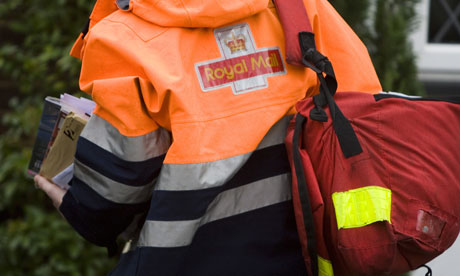
The postman - I will be aranging for a Royal Mail postman to appear in my music video. The first appearance willl be when the postman collects the letters from the postbox, and another postman will also appear when delivering the letter towards the end of the video.
Costume - Since I will be aranging for a Royal Mail postman to be in my music video, the costume will be the conventional and traditional Royal Mail uniform. This normally features a jacket with the Royal Mail logo, carrying a bag or on a bicycle.

Male Character - The male character in my music video is the first character which the viewer sees. This character could be considered as the main character as the first shot will be of this character sitting at a table. The character will be a 17 year old male. I am arranging for one of my friends to fill this part, so hopefully he will be available.
Costume - The character will be wearing very casual normal clothes and puts on a coat when walking out onto the street outside the house. He will also be wearing jeans. Overall a very casual costume to reflect an average older teenage male today.
The postman - I will be aranging for a Royal Mail postman to appear in my music video. The first appearance willl be when the postman collects the letters from the postbox, and another postman will also appear when delivering the letter towards the end of the video.
Costume - Since I will be aranging for a Royal Mail postman to be in my music video, the costume will be the conventional and traditional Royal Mail uniform. This normally features a jacket with the Royal Mail logo, carrying a bag or on a bicycle.
Male Character - The male character in my music video is the first character which the viewer sees. This character could be considered as the main character as the first shot will be of this character sitting at a table. The character will be a 17 year old male. I am arranging for one of my friends to fill this part, so hopefully he will be available.
Costume - The character will be wearing very casual normal clothes and puts on a coat when walking out onto the street outside the house. He will also be wearing jeans. Overall a very casual costume to reflect an average older teenage male today.
Sunday, 7 November 2010
Narrative
Narrative in terms of music videos is the basic underlying storyline of the video itself. A philosopher called Tzvetan Todorov first described the narrative features, splitting them into five differant sections.
Stage 1
A state of equilibrium is defined.
A state of equilibrium is defined.
Stage 2
Disruption to the equilibrium by some action or crisis.
Disruption to the equilibrium by some action or crisis.
Stage 3
The Character(s) recognition that there has been a disruption, setting goals to resolve problem.
Stage 4
The Character(s) attempt to repair the disruption, obstacles need to be overcome to restore order.
Stage 5
Reinstatment to the equilibrium. Situation is resolved, a conclusion is announced.
This basic storyline can be reflected in most modern music videos we see today.
Wednesday, 3 November 2010
Copyright
Almost all popular music released today is protected by copyright from record labels. Copyright is designed to make sure that the artist of the song, gets the correct amount of money back from their music. I finally found a contact address and have written an email to Brushfire Records, the record label of Jack Johnson, requesting permission to use Breakdown by Jack Johnson on my music video. I am hoping for a response soon and Il will post the results here.

(Click for larger image)
Wednesday, 20 October 2010
Ancillary Digipak Research
The image below is an example of a digipak. These CD cases are usually made of cardboard and fold out into about 4-6 differant parts. They are often used for double albums, or CD and DVD combination products.

Here is a slideshow video of some famous and relevant album covers which have given me inspiration for ideas for my digipak. As you can see there is a wide variety of differant album covers. Each one is very individual and styles are often assosiated with types of bands. Some bands have art type album covers, and others have photography based covers.
I will be designing a Digipak promoting my music video, here are some other famous examples of album covers i will be using for inspiration. The Queen album cover features the four band members against a black background. Although the cover is very simple, it has become one of the most iconic Queen images of all time, with the same concept later being used in the music video for Bohemian Rhapsody. This is something i am going to reflect on when i produce the digipak for my music video, by keeping it simple but effective.
I will be designing a Digipak promoting my music video, here are some other famous examples of album covers i will be using for inspiration. The Queen album cover features the four band members against a black background. Although the cover is very simple, it has become one of the most iconic Queen images of all time, with the same concept later being used in the music video for Bohemian Rhapsody. This is something i am going to reflect on when i produce the digipak for my music video, by keeping it simple but effective.

The image below is the album cover for Arctic Monkeys first album "Whatever People Say I Am, That's What I'm Not" The cover is a photo of a friend of the band smoking. The cover was somewhat contraversial with many people critisizing it, saying that it was promoting smoking. Some alternative album covers were released with a similar image but without a cigarrette. Once again this album cover is very simple but also very effective.


This is a quick draft of what the front cover of my digipak may look like. I have edited one of the images from my location research on Photoshop, changing colours and adding text. I have changed the colours so that only the postbox is in colour, emphasing the importance of it.
I have also added a script type font for the title of the artist and song.

Subscribe to:
Posts (Atom)